So guys ! Here are the steps to access SQL Server database remotely.Generally if try to access server database then you will be getting following error . Please go through each step carefully.
Setep :1 .Go to the system which you want to make as a server .Open Sql management studio.Right click on current instance then click on properties.
Step :2. Click on connection and Check the allow remote connection to the server checkbox .Then press ok button.
Step: 3 .Click on security and check the checkbox as shown in following image.Then press ok button.
Step 4: If have already set the id and password then SKIP this step .
Step 5 . Open command prompt type wf.msc .Then press ok button.
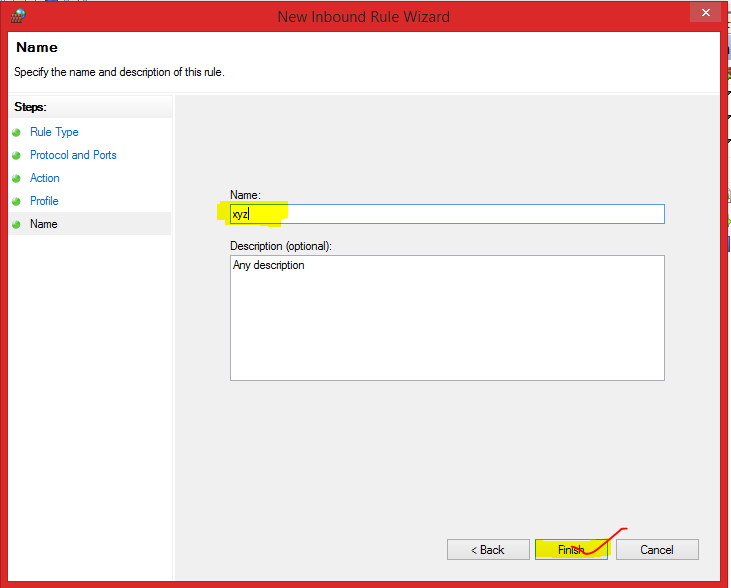
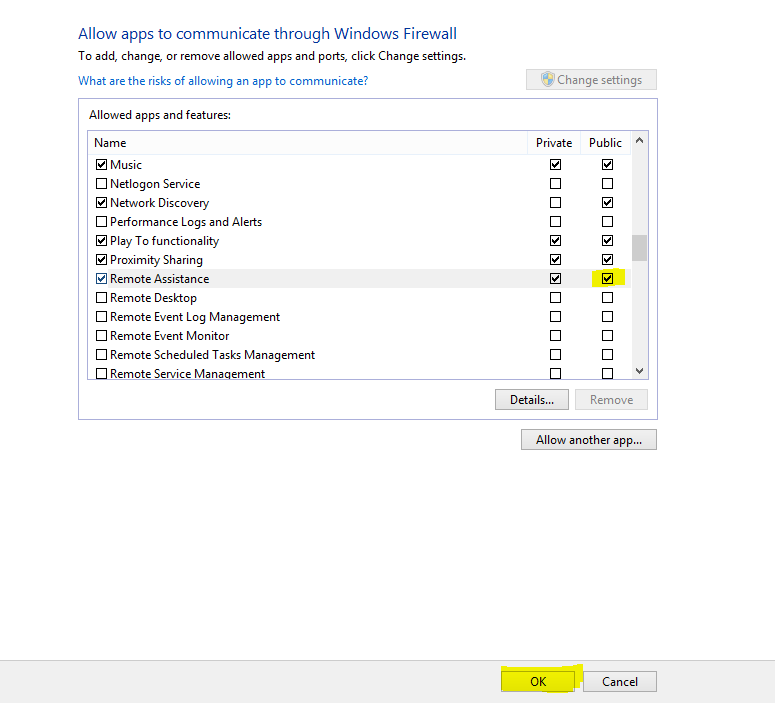
Step 6. Following image showing the firewalls settings .Create new inbound rule for accessing database by other system.
Step 7 .Do as shown in following image .Then press next button.
Make sure the TCP port must be 1433 .
At client side
Step 1 .Open SQL server management studio and connect to database .In the server name textbox click on <brows for more> .Then click on network server tab.
Note: If you dont get any computer name in the list then you can just put the ip Address of the server computer in Server name textbox.
Today I will show you how can you turn your laptop or
desktop into 3D.
I know
you may find it crazy but its true .Before discussing it in details I would
recommend you to watch my video regarding this topic . Install app and get $100 instant ! guaranteed : Install Now Get amazing offer on flipkart.com :Shop Now
Window Colossus 3D desktop is the free software
which can be installed on your windows platform .With this you can customize your
desktop and arrange your folders in 3 dimensional views. I came to know
about this in 2011 and decided to make a video on this. Windows desktop 3d X
now a great product in the market and many people has been satisfied with
this. Here following are the pros and cons of this product as I came to know
from my video viewers.
Pros
#1 Enables you feel new experience.
#2 3D arrangement of folders.
#3 Enable you to customize your own desktop theme
#4 Multiple theme support
#5 Everything at one place .
Cons
#1 May not supported by windows 8 machine
#2 The software get closed every time the system
get started
#3 Consumes more power when system running on
battery
#4 Consume more system memory.
#5 Device may slow down.
The above
result may vary its depends on the user experiences. Ultimately its good
stuff to be used if you have purchased new laptop and want to see
something difference apart from your regular desktop view .
How do I get it?
The different version of Colossus desktop 3d X
can be downloaded from YouTube video makers .They may provide their link to
download this. But don't worry I already have a persistent link .You
don't need to waste you time in searching this software .You can download it
from google drive .
Please follow these steps
Step 1: Open this blog in atleast 20 different tabs.
Step 2: Go to any page and click on only one advertisement shown at top right corner and leave it for atleast 5 mins.
Step 3 : If you are done then ping me on Facebook.com/aapkanigam.Please also send a screenshot of your browser. I will give you the original link to download this awesome software at FREE OF COST.
Step 4: Enjoy the full version.
Conclusion As the
technologies getting advanced everyday ,People must be updated according to it
.
Hope this post will be helpful for you .Please
like, comment and subscribe my videos and blogs.I am here to help you.