Labels

Showing posts with label asp.net mvc tutorial. Show all posts

Monday, May 28, 2018

Part 57- Repository Pattern- 4 - Adding Data Access Layer OR Repository Layer

In this tutorial, You will learn about how to add Data Access/Repository Layer under repository pattern implementation in Asp.net MVC . In Repository pattern I will create different layers but it depends on you whether you need this or not. You can directly create Data Access Layer and create the generic repository methods into this. I will explain generic repository in my upcoming videos. Lets look at below layers 

1. Web Layer is your MVC web Project
2.  Business Layer consist the CRUD operation, gets data from Data Access Layer, Manipulate them and finally returns data to the Controller ( Web Layer)
3. Domain Layer consist the Domain Models or Classes that hold the data coming from Data Access Layer. Both Web and Business Layer can use domain models to exchange data.
4. Data Access Layer consist the generic repository methods (generic CRUD operation), Unit of Work( Database Context) and NON Generic repository( User defined repository).


#How to create Data Access Layer? 

 Please follow below Steps 

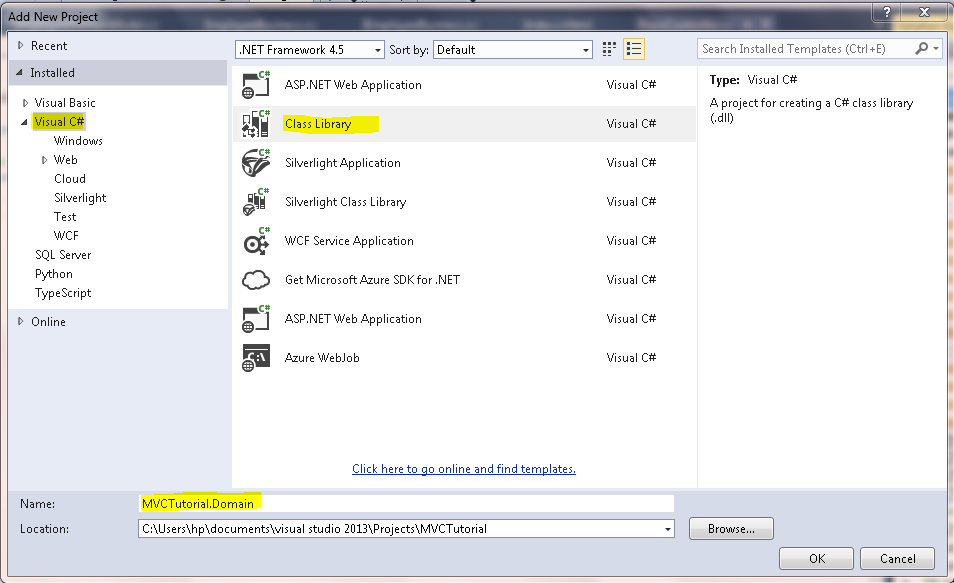
Step 1 : Right Click on your solution and click on Add, then click on New Project.


Step 2 : After opening the popup, select class Library option and give a meaningful name


# How to add Entities into Data Access Layer?
       
Please follow below steps 

                                       A. (Right click on project then add new item)

B . (Select ADO.NET Entity Data Model and give any name)

. (Choose EF Designer then Next)

. (Click on New Connection and Add Server and database. Then Click next)

. (Select Server and Database then click on test connection and ok)

. (Check the dbo checkbox and give a meaningful name and finish)

. (You are done !!!)


Note: In video I explained how to access above entity into Business Layer. But that was just to extra knowledge. I am going to access this entity framework in generic and custom repository methods in next tutorial. 

What Next => In next tutorial we will learn how to  create Generic Repository Methods with UnitOfWork and how to use above Entities. 

Please Like, Share and subscribe our Channel. Have a great day.


All Code Factory


Saturday, May 26, 2018

Part 56 - Repository Pattern - 3 - Dependency Injection using Microsoft Unity


In this tutorial, You will learn about how to implement Dependency Injection in  Asp.net MVC using Microsoft Unity plugin.  In previous tutorial we learned about how to add Business Layer  and Domain Layer. Lets look at below layers and get little idea about what is the use of them.

1. Web Layer is your MVC web Project
2. Business Layer consist the CRUD operation, gets data from Data Access Layer, Manipulate them and finally returns data to the Controller ( Web Layer)
3. Domain Layer consist the Domain Models or Classes that hold the data coming from Data Access Layer. Both Web and Business Layer can use domain models to exchange data.
4. Data Access Layer consist the generic repository methods (generic CRUD operation), Unit of Work( Database Context) and NON Generic repository( User defined repository).


# What is Dependency Injection? 
Dependency Injection is a software design pattern that help us to develop loosely coupled code. 
Loose coupling offers below advantages 

  1. Increases code “Reusability”
  2. Improves code “Maintainability”
  3. Improves “Testability”

Real life Example: In above picture, the boy and girl are married, it means they are highly dependent on each other or you can say they are tightly coupled. But after using dependency injection they become loosely coupled or independent. In real life, getting divorced is not a good solution . On the contrary, in Software architecture it would be one of the best solution. 

We might have seen in a big project , several sets of developer working on different modules . It would be a great idea if they can work independently without effecting other's work. 

Generally, we have dependency on object of a class that creates a tightly coupled architecture.
For example, we have a class in our Business Layer and it consist some methods. Now if I create the instance of this class into my Web Layer's controller then, both Business and Web Layer will be tightly coupled. 

Our basic idea of using dependency injection is to remove dependency from our persistence resource like entity framework.  

# What are the ways to implement Dependency Injection?
 we can use any of the following way

  1. Constructor Injection
  2. Property/Setter injection
  3. Method injection


 In this tutorial, we will be implementing DI using Constructor Injection. In this, we pass the dependent object as a parameter into the constructor  of the controller


# Steps to implement Dependency Injection using Microsoft Unity?

Step 1 :  Right Click on your solution and click on Manage NuGet Package


 Step 2 :  Search Unity.MVC5 and install the plugin


Step 3 : After installing plugin, a config file(UnityConfig.cs) will be created in your AppConfig Folder. Open that file and add below setting into this.


 Copy "container.RegisterType<IEmployeeBusiness, EmployeeBusiness>();"  in your UnityConfig.cs file. I expecting, you already have watched my previous tutorial i.e How to add Business Layer  and Domain Layer in MVC. Copy


using MVCTutorial.Business;
using MVCTutorial.Business.Interface;
using MVCTutorial.Infrastructure;
using System.Web.Mvc;
using Unity;
using Unity.Injection;
using Unity.Mvc5;

namespace MVCTutorial
{
    public static class UnityConfig
    {
        public static void RegisterComponents()
        {
   var container = new UnityContainer();
            
            // register all your components with the container here
            // it is NOT necessary to register your controllers
            
            // e.g. container.RegisterType<ITestService, TestService>();

            container.RegisterType<IEmployeeBusiness, EmployeeBusiness>();
           
            DependencyResolver.SetResolver(new UnityDependencyResolver(container));
        }
    }
}


Step 4 :(IGNORE this step if you already have below interface and Class created in your project). 
In previous tutorial(How to add Business Layerif you do remember, we added interface and concrete class into our Business Layer. Do you? If not then create  Business Layer and do below things..
 "Add an Interface Folder into your business layer then create IEmployeBusiness interface and finally add a method into this example: GetEmployeeName(). After adding interface, add a concrete class EmpolyeeBusiness which will implement the IEmployeeBusiness Methods. Please see below screenshot. Copy below code in your interface and class."  


A. IEmployeeBusiness( Interface) 
using MVCTutorial.Domain;
using System;
using System.Collections.Generic;
using System.Linq;
using System.Text;
using System.Threading.Tasks;

namespace MVCTutorial.Business.Interface
{
    public interface IEmployeeBusiness
    {
        string GetEmployeeName(int EmpId);
        List<EmployeeDomainModel> GetAllEmployee();
    }
}


B. Employeebusiness ( Concrete class)

using MVCTutorial.Business.Interface;
using MVCTutorial.Domain;
using MVCTutorial.Repository;
using System;
using System.Collections.Generic;
using System.Linq;
using System.Text;
using System.Threading.Tasks;

namespace MVCTutorial.Business
{
    public class EmployeeBusiness : IEmployeeBusiness
    {

        public string GetEmployeeName(int EmpId)
        {
            return "Ashish" + EmpId;
        }

        public List<EmployeeDomainModel> GetAllEmployee()
        {
            List<EmployeeDomainModel> list = new List<EmployeeDomainModel>();

            list.Add(new EmployeeDomainModel { Name = "Ashish", EmployeeId = 1 });
            list.Add(new EmployeeDomainModel { Name = "Rob", EmployeeId = 2 });
            list.Add(new EmployeeDomainModel { Name = "Sara", EmployeeId = 3 });
            list.Add(new EmployeeDomainModel { Name = "Jack", EmployeeId = 4 });
            list.Add(new EmployeeDomainModel { Name = "Peter", EmployeeId = 5 });

            return list;

        }
    }
}


Step 5 :  Open your RepoController.cs file and paste below code. Here you can see, I have passed an interface object(IEmployeeBusiness empBusiness) as a parameter into the constructor of the controller. But wait, instead of interface I was expecting to pass the instance of EmployeeBusiness. If I directly pass it into the constructor then it will not follow the OOP Principle - "depend on the abstraction not on the concrete classes".  So in this situation, Unity5 plugin help me to resolve this problem automatically.

#Controller Code(RepoController.cs) : 

using MVCTutorial.Business;
using MVCTutorial.Business.Interface;
using MVCTutorial.Domain;
using MVCTutorial.Models;
using System;
using System.Collections.Generic;
using System.Linq;
using System.Web;
using System.Web.Mvc;

namespace MVCTutorial.Controllers
{
    public class RepoController : Controller
    {
        IEmployeeBusiness _empBusiness;

        // oop principle: depend on the abstraction not on the concrete classes

        public RepoController(IEmployeeBusiness empBusiness)
        {
            _empBusiness = empBusiness;
        }

        // GET: Repo
        public ActionResult Index()
        {

            ViewBag.EmpName = _empBusiness.GetEmployeeName(254);

            List<EmployeeDomainModel> listDomain = _empBusiness.GetAllEmployee();

            List<EmployeeViewModel> listemployeeVM = new List<EmployeeViewModel>();

            AutoMapper.Mapper.Map(listDomain, listemployeeVM);

            ViewBag.EmployeeList = listemployeeVM;


            return View();
        }
    }
}

Step 6 :  Go to your Global.asax file and add "UnityConfig.RegisterComponents();" into this. 


using MVCTutorial.Infrastructure;
using System;
using System.Collections.Generic;
using System.Globalization;
using System.Linq;
using System.Threading;
using System.Web;
using System.Web.Mvc;
using System.Web.Optimization;
using System.Web.Routing;

namespace MVCTutorial
{
    public class MvcApplication : System.Web.HttpApplication
    {
        protected void Application_Start()
        {
            AreaRegistration.RegisterAllAreas();
            UnityConfig.RegisterComponents();
            FilterConfig.RegisterGlobalFilters(GlobalFilters.Filters);
            RouteConfig.RegisterRoutes(RouteTable.Routes);
            BundleConfig.RegisterBundles(BundleTable.Bundles);
            AutomapperWebProfile.Run();

            //System.Web.Optimization.BundleTable.EnableOptimizations = true;
        }

       
    }
}


Hope you enjoyed this lesion!

Please Like, Share and subscribe our Channel. Have a great day.


All Code Factory

Part 55 - Repository Pattern - 2 - Adding Domain Layer in Asp.Net MVC


In this tutorial, You will learn about how to add Domain Layer under repository pattern implementation in Asp.net MVC . In previous tutorial we learned about how to add Business Layer . Lets again look at below layers and get idea about what is the use of them.

1. Web Layer is your MVC web Project
2. Business Layer consist the CRUD operation, gets data from Data Access Layer, Manipulate them and finally returns data to the Controller ( Web Layer)
3. Domain Layer consist the Domain Models or Classes that hold the data coming from Data Access Layer. Both Web and Business Layer can use domain models to exchange data.
4. Data Access Layer consist the generic repository methods (generic CRUD operation), Unit of Work( Database Context) and NON Generic repository( User defined repository).


#How to create Domain Layer? 

 Please follow below Steps 

Step 1 :  Right Click on your solution and click on Add, then click on New Project. If you notice that, this step is similar to our previous tutorial for adding Business Layer . Isn't it.


Step 2 : After opening the popup, select class Library option and give a meaningful name


Step 3 : Add a class( EmployeeDomainModel.cs) into your Domain Layer 


 Copy below content in your EmployeeDomainLayer Class

using System;
using System.Collections.Generic;
using System.Linq;
using System.Text;
using System.Threading.Tasks;

namespace MVCTutorial.Domain
{
    public class EmployeeDomainModel
    {
       
        public int EmployeeId { get; set; }
        public string Name { get; set; }        
        public string Address { get; set; }
        public string DepartmentName { get; set; }
    }
}


Step 4 : In previous tutorial(How to add Business Layer) if you do remember, we added interface and concrete class into our Business Layer. Do you? If not then create  Business Layer and do below things..
 "Add an Interface Folder into your business layer then create IEmployeBusiness interface and finally add a method into this example: GetEmployeeName(). After adding interface, add a concrete class EmpolyeeBusiness which will implement the IEmployeeBusiness Methods. Please see below screenshot. Copy below code in your interface and class." 


Now in this tutorial, we are gonna add one more method(GetAllEmployee()) in our Business layer's  interface and class. 

A. IEmployeeBusiness( Interface) 
using MVCTutorial.Domain;
using System;
using System.Collections.Generic;
using System.Linq;
using System.Text;
using System.Threading.Tasks;

namespace MVCTutorial.Business.Interface
{
    public interface IEmployeeBusiness
    {
        string GetEmployeeName(int EmpId);
        List<EmployeeDomainModel> GetAllEmployee();
    }
}


B. Employeebusiness ( Concrete class)

using MVCTutorial.Business.Interface;
using MVCTutorial.Domain;
using MVCTutorial.Repository;
using System;
using System.Collections.Generic;
using System.Linq;
using System.Text;
using System.Threading.Tasks;

namespace MVCTutorial.Business
{
    public class EmployeeBusiness : IEmployeeBusiness
    {

        public string GetEmployeeName(int EmpId)
        {
            return "Ashish" + EmpId;
        }

        public List<EmployeeDomainModel> GetAllEmployee()
        {
            List<EmployeeDomainModel> list = new List<EmployeeDomainModel>();

            list.Add(new EmployeeDomainModel { Name = "Ashish", EmployeeId = 1 });
            list.Add(new EmployeeDomainModel { Name = "Rob", EmployeeId = 2 });
            list.Add(new EmployeeDomainModel { Name = "Sara", EmployeeId = 3 });
            list.Add(new EmployeeDomainModel { Name = "Jack", EmployeeId = 4 });
            list.Add(new EmployeeDomainModel { Name = "Peter", EmployeeId = 5 });

            return list;

        }
    }
}


Step 5 : Go to your Web Layer and add the reference of Domain Layer (check the MVCTutorial.Domain  checkbox ). I hope you already added the reference of Business Layer. Forget about MVCTutorial.Repository, we will cover that in next tutorial.

  
Step 6 : Create an instance of EmployeeBusiness Class in your controller, then access GetEmployeeName() method and you are done. Here you will  notice that, we are creating an instance of EmployeeBusiness, then calling GetAllEmployee() method and finally storing data into EmployeeDomainModel list (see listDomain).  I have stored this list of data into  ViewBag.EmployeeList.  Further, I can use it anywhere in my View

#Controller Code(RepoController.cs) : Copy the controller code below.

using MVCTutorial.Business;
using MVCTutorial.Business.Interface;
using MVCTutorial.Domain;
using MVCTutorial.Models;
using System;
using System.Collections.Generic;
using System.Linq;
using System.Web;
using System.Web.Mvc;

namespace MVCTutorial.Controllers
{
    public class RepoController : Controller
    {
        public ActionResult Index()
        {
            IEmployeeBusiness _empBusiness = new EmployeeBusiness();

            ViewBag.EmpName = _empBusiness.GetEmployeeName(254);

            List<EmployeeDomainModel> listDomain = _empBusiness.GetAllEmployee();

            //List<EmployeeViewModel> listemployeeVM = new List<EmployeeViewModel>();

            //AutoMapper.Mapper.Map(listDomain, listemployeeVM);

            ViewBag.EmployeeList = listDomain;


            return View();
        }
    }
}


Note: In above code, I have commented the line where I have used  Automapper. If you want to learn how the Automapper helps in object to object mapping then you can visit here (How to use Automapper in MVC)

What NEXT=>( Dependency Injection In Asp.net MVC )

Please Like, Share and subscribe our Channel. Have a great day.


All Code Factory

Part 54 - Repository Pattern - 1 - Adding Business Layer in Asp.net MVC

In this tutorial, You will learn about how to add Business layer under repository pattern implementation in Asp.net MVC . In Repository pattern I will create different layers but it depends on you whether you need this or not. You can directly create Data Access Layer and create the generic repository methods into this. I will explain generic repository in my upcoming videos. Lets look at below layers 

1. Web Layer is your MVC web Project
2. Business Layer consist the CRUD operation, gets data from Data Access Layer, Manipulate them and finally returns data to the Controller ( Web Layer)
3. Domain Layer consist the Domain Models or Classes that hold the data coming from Data Access Layer. Both Web and Business Layer can use domain models to exchange data.
4. Data Access Layer consist the generic repository methods (generic CRUD operation), Unit of Work( Database Context) and NON Generic repository( User defined repository).


#How to create Business Layer? 

 Please follow below Steps 

Step 1 : Right Click on your solution and click on Add, then click on New Project.


Step 2 : After opening the popup, select class Library option and give a meaningful name


Step 3 : Add an Interface Folder into your business layer then create IEmployeBusiness interface and finally add a method into this example: GetEmployeeName(). After adding interface, add a concrete class EmpolyeeBusiness which will implement the IEmployeeBusiness Methods. Please see below screenshot. Copy below code in your interface and class.


A. IEmployeeBusiness( Interface) 
using MVCTutorial.Domain;
using System;
using System.Collections.Generic;
using System.Linq;
using System.Text;
using System.Threading.Tasks;

namespace MVCTutorial.Business.Interface
{
    public interface IEmployeeBusiness
    {
        string GetEmployeeName(int EmpId);
       
    }
}

B. Employeebusiness ( Concrete class)

using MVCTutorial.Business.Interface;
using MVCTutorial.Domain;
using MVCTutorial.Repository;
using System;
using System.Collections.Generic;
using System.Linq;
using System.Text;
using System.Threading.Tasks;

namespace MVCTutorial.Business
{
    public class EmployeeBusiness : IEmployeeBusiness
    {
        public string GetEmployeeName(int EmpId)
        {
            return "Ashish" + EmpId;
        }

       
    }
}


Step 4 : Go to your Web Layer and add the reference of Business layer (check the MVCTutorial.Businesss  checkbox ). You don't need to care about Domain Layer right now.

  
Step 4 : Create an instance of EmployeeBusiness Class in your controller, then access GetEmployeeName() method and you are done. Copy the controller code below.

#Controller Code(RepoController.cs) 

using MVCTutorial.Business;
using MVCTutorial.Business.Interface;
using MVCTutorial.Domain;
using MVCTutorial.Models;
using System;
using System.Collections.Generic;
using System.Linq;
using System.Web;
using System.Web.Mvc;

namespace MVCTutorial.Controllers
{
    public class RepoController : Controller
    {
       
        // GET: Repo
        public ActionResult Index()
        {
            IEmployeeBusiness _empBusiness = new EmployeeBusiness();
            ViewBag.EmpName = _empBusiness.GetEmployeeName(254);

           
            return View();
        }
    }
}

Note: Don't forget to resolve your in case you get item missing error. Right click on error then resolve it.  What Next => (How to add Domain Layer )

Please Like, Share and subscribe our Channel. Have a great day.


All Code Factory