Showing posts with label earn money. Show all posts

Sunday, March 13, 2016

What is an Affiliate Marketing ?

Do you know what is Affiliate marketing?
I think every developer or a blogger should know about this .An Affiliate marketing is the program through which a publisher  shows the deal of the merchants,If any user click on that deal and make payment then publisher gets approx $2 for each sale.
Its little bit confusing but its really an interesting concept.
To understand this you should know the terms related to affiliate marketing.
1.Merchant : Who actually sales his product .
2. Advertiser: Who advertise the merchant's product.(ex flipkart)
3.Publisher : who supports the advertiser's deal(ex gsmarena.com)
Let me explain the scenario how it works ..
Suppose a merchant wants to sale his product so he goes to flipkart for its advertisement. Flipkart knows if it distribute its advertisement then sale rate will automatically be boosted .So in order to maximise sale flipkart provides Affiliate Marketing facility.
Now following example will make you understand what exactly an Affiliate Program is.
Let suppose you want to purchase a Samsung mobile .Hopefully you will search for its specifications. So you goto gsmarena.com or may be other popular  sites.You might have noticed when you search for Samsung mobile then gsmarena put some cookies into your browser for particular duration. So if you search samsung mobile for the next time then gsmarena will be on the top of the serached list .This is hidden strategy .A general user doesn't know about  what is exactly happening into his browser .
I hope when you visit  gsmarena you will see the advertisement of flipkart in the  header ,footer ,or at sidebar section.
When you click on the advertisement and goto flipkart  and purchase some item from there then in that case gsmarena will get approx $2 (variable depends on t&c of flipkart ).
So finally in this case gsmarena played a role as an advertiser who advertised the flipkart deals.
Do you know what is the purpose of putting cookies into browser?
There are several benefits but the main advantage is that if once you visit gsmarena for the seeing specification then you close your browser and come back after 3days and directly goto flipkart and make payment then in that case also gsmarena gets $2 because its cookies are already in your browser.
So flipkart can easily track who is advertising my deals on his website.
Hope you guys understood this amazing online Marketing  strategy.
Next time when you host your website make  sure to register for the Affiliate program. There are several sites providing there affiliate membership.
For example
You can visit Hostgator.com to register for its  affiliate program.They will provide you a javascript code .Put them into html body section .The hostgator deals and offers will be started on your website.Then you can also earn $2 or more for each sales in that case if user go to hostgator.com via your website.
Thanku @Ashish .



Monday, November 23, 2015

Black Friday Bumper Offer Get 80% OFF


Get Flat 80% off  this Cyber Monday

Sale Details:  65% off all new Hosting plus $5.99 .com & .net Domains
·         Link ID: 243116
·         Coupon Code: CM2015
·         Sale Starts: Monday, November 30th at 12am CST
·         Sale Ends: Monday, November 30th at 11:59pm CST

Surprise FLASH SALES
Signup Now with following coupon codes and get 80% off. Offer will be valid from 27th November
MONDAY NOVEMBER 30th,2015
Sale Details: 80% off all new Hosting plus $2.99 .com & .net Domains
How to Grab 80% Discount using HostGator Black Friday Coupon?
In these 4 days, HostGator will run so many Flash sales of 1-1 hours in which they will offer 80% discount on each hosting plan. Except these Flash sales, HostGator will be giving 65% discount on their hosting plans.
So If you want to grab HostGator hosting with 65% discount then you can grab it anytime otherwise catch the deal when HostGator 80% discount Flash sale will be live.
·         #Step-1: First of all, Click on this link . Get 80% off Now
·         #Step-2: Select the hosting plan according to your requirements and then click on” Signup Now” button.
·         #Step-3: Fill your domain name, username and billing details and then click on”Checkout Now” button.
·         #Step-4: You are Done
.

HostGator offers three different shared hosting plans.
  • Hatchling Plan
  • Baby Plan
  • Business Plan
BABY PLAN is the most recommended plan for the newbie bloggers because It will allow you to host multiple domains on your single hosting account which will help you to start other new websites in future.
As you can see in the below screenshot, Baby Plan is offering:
  • Unlimited Domains
  • One Click Installs
  • Unmetered Bandwidth


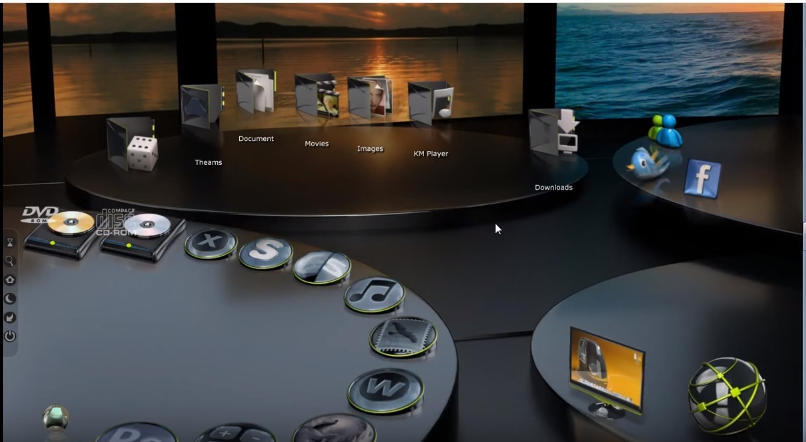
  Download from Google Drive : WINDOW 7 3D DESKTOP X 3.5 ( file size: 81Mb)


Saturday, October 17, 2015

A Complete Journey to Google Adsense Payment - Everyone can make money

Hello  Everyone !!


Today I will share my whole experience with you regarding online money making through Google Adsense.


Five year ago when I was in college  I did not have much knowledge about computer but I had the passion of learning computer science. That's why I chose computer science engineering .when I was in 2nd year I came to know about internet browsing .It was my good luck that there was free Wi-Fi available in my hostel room .I purchased a laptop and started browsing .Everyday I used to learn new thing whether it was related to my course or  related to how to connect world through internet .I started registering on every website coming in way in order to get into that and grasp some knowledge.

The story began when I opened my account on youtube.com in 3rd  year of my b.tech career.The purpose of opening account was something different .You will not believe I was a singer also .So for the sake of getting popular I uploaded several videos on youtube but no body liked my videos. I did not get disappointed .I continued to upload more and more videos .When I reached to 4th year I  became an expert in computer technology .I used to learn Asp.Net from youtube .One day I got an idea why not I should upload the technology related videos as they get easily popular as everyone is excited to learn computer technology. I made a video Windows 7 3D desktop and uploaded to youtube and left it for 1 month as I was busy in my exam. After the exam get finished I opened my youtube account .I got surprised ,My video reached to 6000 views  and 20 subscribers .Now I was confident enough about how to get popular on youtube.


Adsense entry in my life:


One day I got a link ,It was related to how to make money through Adsense . After going in detail I found that I can also make money through my youtube channel .I was completely surprised that whatever I was doing was quite worthy. I opened an account on Adsense and followed the steps to connect my youtube videos for Adsense . Within one year I got more than one lakh views and more than one thousand likes on my video. Now I am  a popular publisher on youtube and its partner too.

I have been using  Adsense for one and half year .Today I successfully received $113.62 in my personal account. Reaching $113.62 was not an issues but getting that amount was quite difficult. Specially for Indian Adsense Publisher.I will show you what steps i followed to get that payment .


What are the steps that I followed for successful payment :
  
Step 1 : (Address verification) :Firstly I filled all personal details correctly on Adsense when my balance was below $100. It was necessary to provide correct address on which Adsense will send you a PIN to ensure your identity .There are three attempts to reissue the PIN on given address .I attempted all three attempts because I did not get any PIN on my address. I was fortunate because Google provides online address verification after all three attempt are made .I find the link beneath  the textbox in which  you enter your received PIN. Then I redirected to a new form in which I filled all entries and attached my Driving license HD Photo and finally submitted. Within four hour Google sent me a successful address verification message.Follow either of the following step 

(a).Enter  PIN if you get it from google on you mentioned address or see (b) part


 (b) Submit online proof if you have entered wrong PIN three times 


Step 2:  (Bank account information ) : When my Adsense balance reached  more than $100 I provided my account details on Adsense .Thank God  Google now sends the payment via Wire Transfer  .Its more convenient and flexible then  Payment through check. For this I provided my Name , Account Number ,IFSC Code  and Swift code . 


    Provide bank Account details


Step 3 : ( Fighting with problems) : Providing bank details was not enough for me to get Adsense payment easily . After completing above two steps Google Adsense sent me the payment instantly .Usually through wire transfer amount reaches within three business day .I waited for 4 days but did not get in my personal saving account .Then I called to customer care of my IndusInd bank .I asked about the transaction .They asked me to provide  remitter details (google’s account number and transaction details) in order to track the payment . I was confused how could I contact Adsense team .Then after a lot of surfing I found the solution .

 (i)      Adsense provide Wire Transfer Troubleshooter to get over to payment related problems . During troubleshoot process I filled a form in which I provided the necessary information.You should submit this form only after 10 business days Google transfer the payment. Adsense Help helped me a lot to understand the whole scenario. 


After clicking the above circled  link 


(ii)             Within a day I got a mail from Adsense team explaining what to do. But that was not enough for me .Then in  reply I asked their account number and transaction details as my bank customer care told me to ask. On the next day I got a second mail from Adsense team with having all  information related to transaction .They confirmed me that the payment successfully reached into my bank .

    First mail recieved from adsense

           Second mail received from Adsense


(iii)    I contacted my bank customer care and submitted the screenshot of Adsense payment and also forwarded the mail received from  Adsense.

(iv)         Today they called me to visit bank and told me sign on notary paper that I have successfully received the amount . They told me to open a business account for International Payment in order to get money directly into my account. Otherwise with my saving account I have to visit the bank and sign on notary paper every time to receive next payment from Google . 


Finally i got my payment and become  a successful Adsense Publisher .

---------------------------------------------------------------------------------------------------------


  Download from Google Drive : WINDOW 7 3D DESKTOP X 3.5 ( file size: 81Mb)


     Thank you very much ! Please share this post if you like it!